
Active Directory Security Reports
DSRAZOR for Windows
- Audit Active Directory security settings
- Quickly cleaup users and update security attributes
Audit Active Directory security settings
DSRAZOR for Windows gives you the ability to audit and document vital Active Directory security settings. Filter on almost any combination of Active Directory attributes.
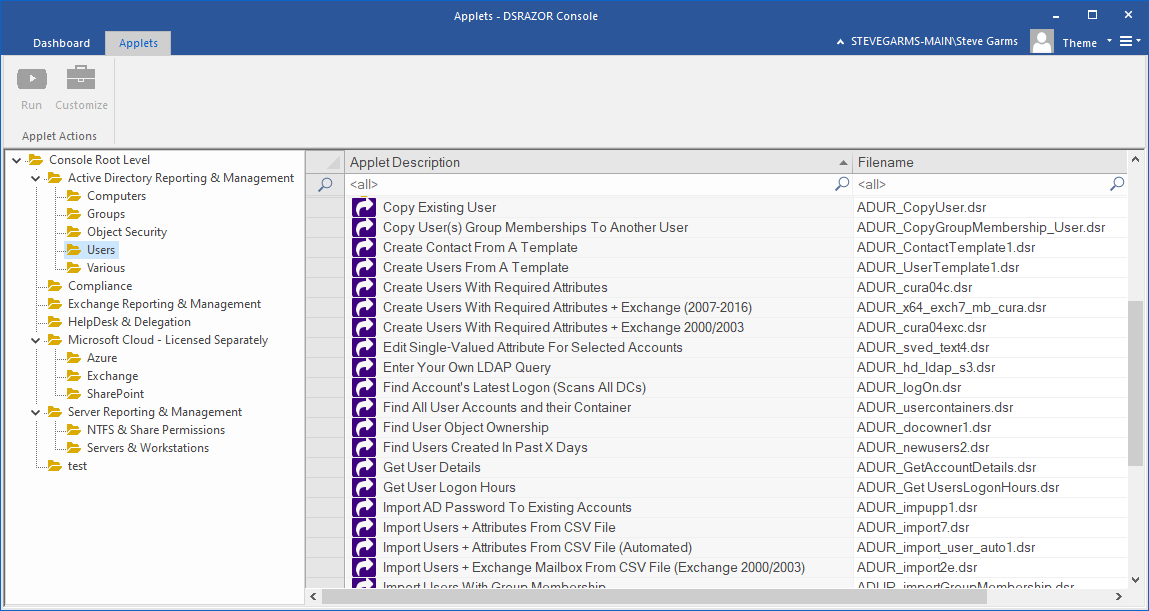
DSRAZOR provides many ready-to-run reports to help audit your Active Directory securiting settings
- AD Document Account Security Details
- Report the following security information about Active Directory users:
- "Account enabled?", "Dial-in permission?","Password age", "Last Logon", "Member of Domain Admin group?", "Account locked out?", "Does account has direct reports?", "Is the account's logon time restricted?", "Account expiration date"
- Active Directory Trustees with Admin privileges (users and groups)
- Find all accounts that have Admin privileges. Objects controlled by the user account can be viewed. The list of objects controlled can be modified.
- Active Directory Object Permission Inheritance
- Document whether permission inheritance has been specifically removed or not. The following details are reported:
- "Object's Distinguished Name", "Inheritance blocked?", "Total number of Access Control Entries + count of explicit/inherited permissions", "Owner Name", "Number of allow/deny ACEs", "Object class"
- AD Trustees with 'Allowed to Authenticate' privilege
- Find all accounts that have the Allowed to Authenticate privilege and optionally modify the resulting trustees.
- AD Trustees with 'Send As' privilege
- Find all accounts that have the "Send As" privilege and optionally modify the resulting trustees.
Cleanup stale Active Directory objects and improve security
Improve Active Directory performance by removing unused users and computers.
Quickly find all inactive, disabled, unused users and computers and with just a click of a button choose to
delete, disable or move to another container.
Update security attributes to any list of users with a click of a button.
- Find stale users and computers
- Report disabled, locked, expired, "never logged in", and "unused in X days" accounts
- Report computer accounts where the Password Last Set was more than X days ago
- Move/Delete/Disable reported accounts
- Smart User Delete deletes the user, their Exchange account, and Home Directory at the same time!
- Move user and Computer objects
- Move user's home directory
- Change user's profile path
- Delete Active Directory Users in bulk
- Remove home directory, remove Exchange mailbox, remove SID History from user
- Find and resolve security issues
- Find user accounts with password problems (passwords that never expire, accounts with no password requirements, expired passwords)
- Unlock user accounts
Get a free trial of DSRAZOR for Windows today!
DSRAZOR includes 1 YEAR of our world class support!
Unlimited Training
We'll make sure you can take advantage of everything DSRAZOR has to offer.
Unlimited Support
Our rapid-response support team can assist with any questions you may have.
Custom Applet Design
Need more? Just ask! We'll create a custom solution that fits your needs.
