
Home / DSRAZOR for Windows
Active Directory Group Membership Management
DSRAZOR for Windows
- Audit and export Active Directory group membership details
- Easily manage and modify group membership
Active Directory Group Membership Reports
DSRAZOR for Windows provides tools to audit your vital Active Directory group membership details. Using our ready-to-run reports, you can list your Active Directory Group membership and export it for management purposes.
- Document group membership by group
- List all of the members of a group
- Document group membership by user
- List a specific user's group membership
- Report groups that are members
- Find groups that are members of another group

Manage Active Directory Group Membership
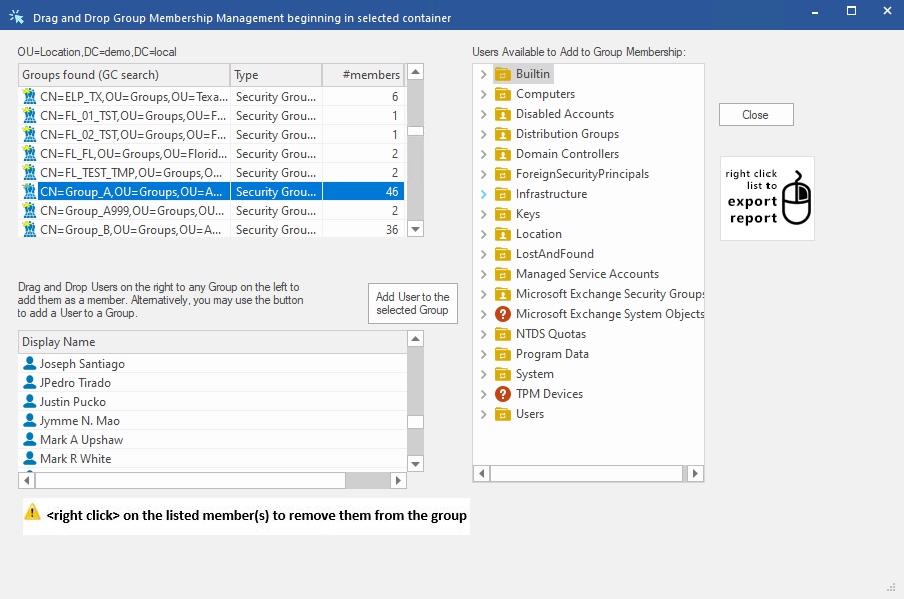
DSRAZOR lets you quickly and easily manage group membership of any user/group within Active Directory via its drag-and-drop applet.
- Easy to use interface
- List all groups within a container, and enumerate that group's membership
- Add/Remove users in bulk
- Select multiple users to add from within the applet
Get a free trial of DSRAZOR for Windows today!
DSRAZOR includes 1 YEAR of our world class support!
Unlimited Training
We'll make sure you can take advantage of everything DSRAZOR has to offer.
Unlimited Support
Our rapid-response support team can assist with any questions you may have.
Custom Applet Design
Need more? Just ask! We'll create a custom solution that fits your needs.
