
Reporting Active Directory User Accounts and Attributes
with DSRAZOR for Windows - a suite of Active Directory, file permission, and server management tools.
- Quickly document AD user and group status, permissions, and attributes
- Filter on almost any combination of Active Directory objects and attributes
- Preconfigured reports come ready-to-run
DSRAZOR for Windows makes it easy to keep track of your Active Directory users and groups.
Quickly run AD user and group reports listing group membership, effective file permissions, accounts that are disabled, expired, locked, unused in X days, and more.
Audit your Active Directory users
With DSRAZOR, you can report on your Active Directory user accounts and filter on any combination of attributes in your AD schema.
You can use DSRAZOR to figure out...
Which user accounts are disabled?
Which users in a specific group have not logged in within the last 60 days?
Which users a member of a specific group?
And much, much more!Try Now! Request a Demo
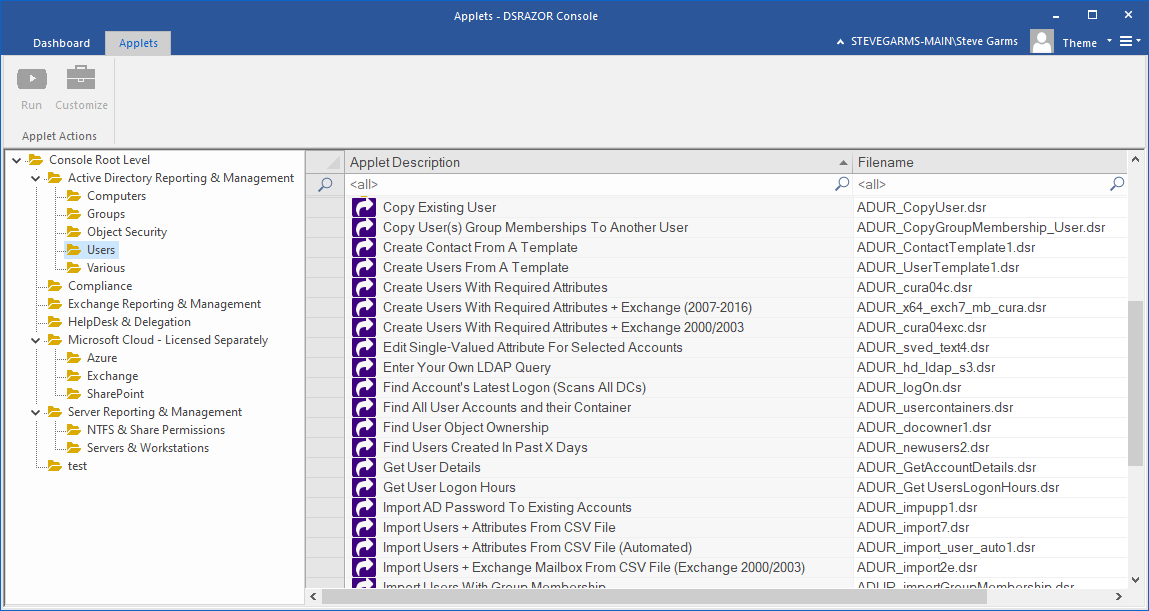
Preconfigured reports are ready-to-run
Get started with reporting immediately. DSRAZOR comes with a plethora of ready-to-run reports to help you document Active Directory.
DSRAZOR can be ran from any Windows workstation or server in your domain. Reports can be generated in the background while you complete other tasks.
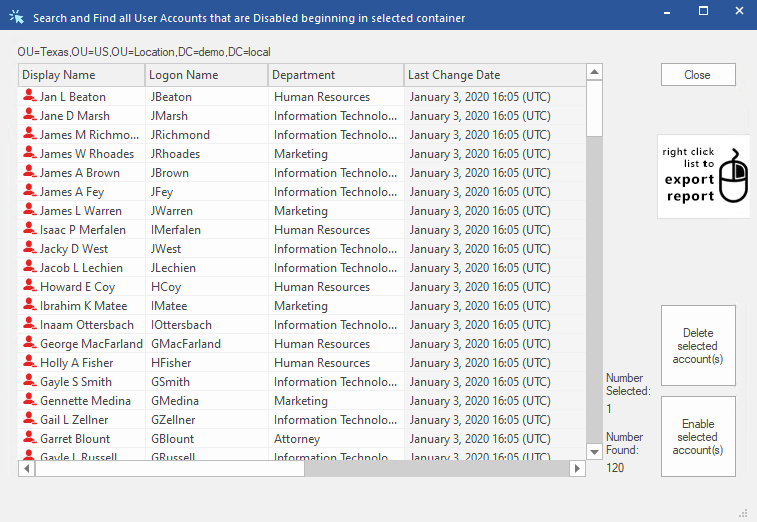
DSRAZOR's prepackaged user reports can help you with the following:
- Find accounts that are locked, disabled, or have never logged in
- Find accounts that are expired or that never expire
- Find accounts unused for X days
- Find accounts where the last logon failed
- Find accounts with Dialin permission
- ACL Documentation per AD Object
- List Active Directory Document Account Security Details
- Figure out accounts' Last Logon by DC
- List Active Directory Objects with a NULL ACL (no access restrictions)
- List Active Directory Objects with GPO(s) defined
- List Active Directory Password Security Settings per User
- Find Active Directory Trustees with Admin privileges (users and groups)
- Find Active Directory Trustees with "Allowed to Authenticate" privileges
- Find Active Directory Trustees with invalid (orphaned) SIDs and clean them up
- Find Active Directory Trustees with "Send As" privilege
- List the FSMO Roles for selected Domain
- List GPOs by Domain
- and much more!
Get a free trial of DSRAZOR for Windows today!
DSRAZOR includes 1 YEAR of our world class support!
Unlimited Training
We'll make sure you can take advantage of everything DSRAZOR has to offer.
Unlimited Support
Our rapid-response support team can assist with any questions you may have.
Custom Applet Design
Need more? Just ask! We'll create a custom solution that fits your needs.
